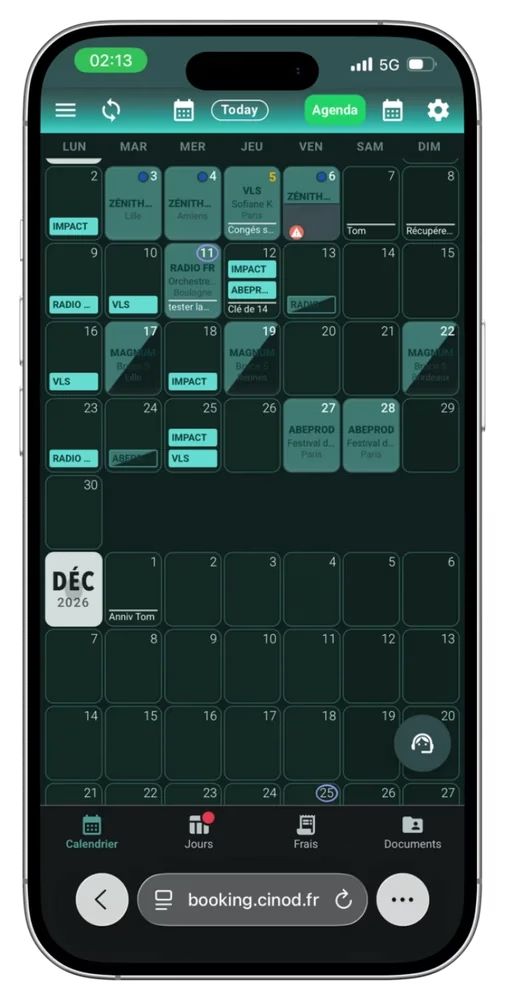
The intermittents’ calendar: your work diary, your hours and your documents in one place.
Employer, times and venue in every slot, contracts, expenses, invoices, payslips and bank checks: one app, on your phone and on your computer. Built for French “intermittents du spectacle”, and just as useful for everyone else in the trade.
Not an intermittent? It’s for you too →See it at JTSE 2026, Innovation Area, 25 & 26 November.
Built for intermittents, useful to everyone working in live events.
Employee, self-employed, company owner, or intermittent who also invoices some jobs: the calendar brings your dates, projects, documents and payments together in one place.
A switch in the preferences turns off intermittent mode. The features tied to the French scheme (507-hour counter, France Travail, AEM, Congés Spectacles) disappear, and everything else stays: calendar, day sheets, contracts, expenses, documents, bank reconciliation.
Your invoices, tracked until they are paid
- Create your invoice in the app, like an expense report, and send it to your client.
- It shows up in your calendar on the date you issued it.
- During bank reconciliation, the app finds the payment on your statement and ticks the invoice as paid, automatically.
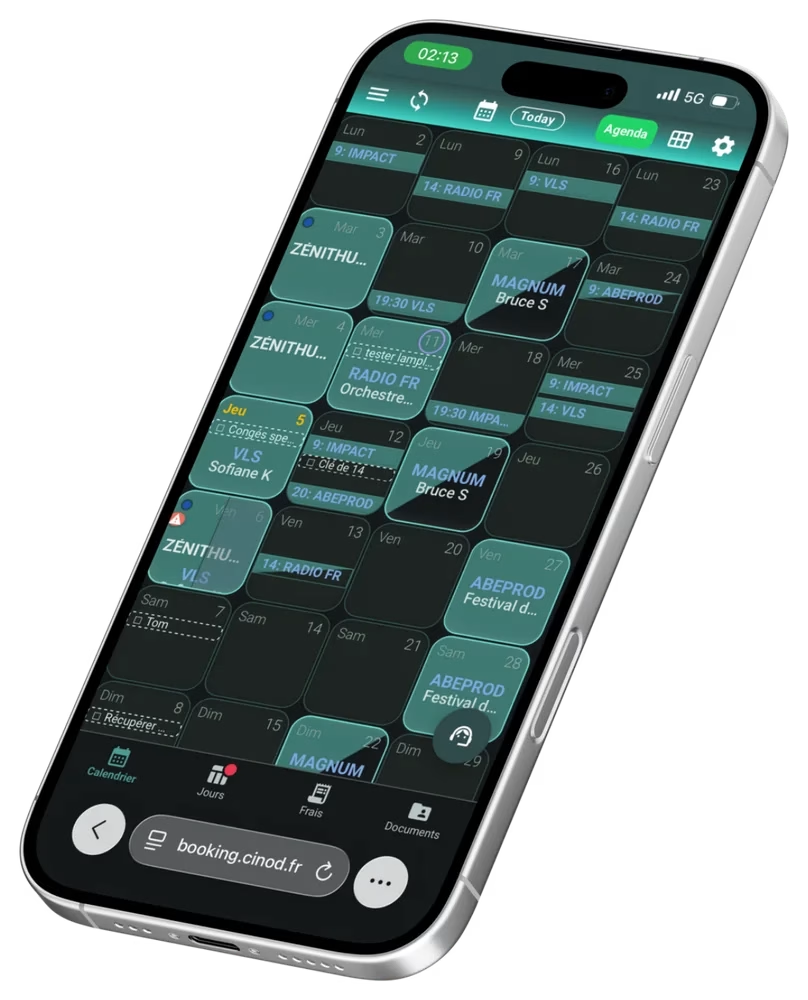
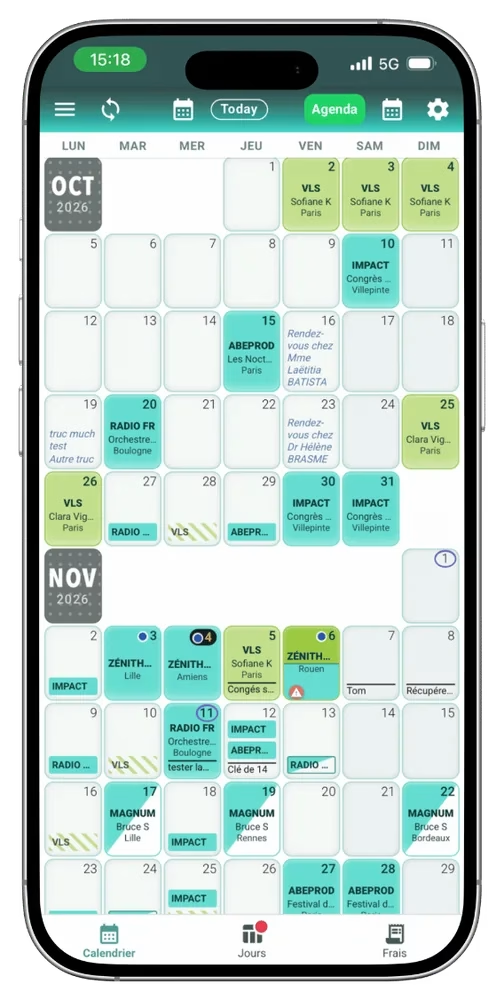
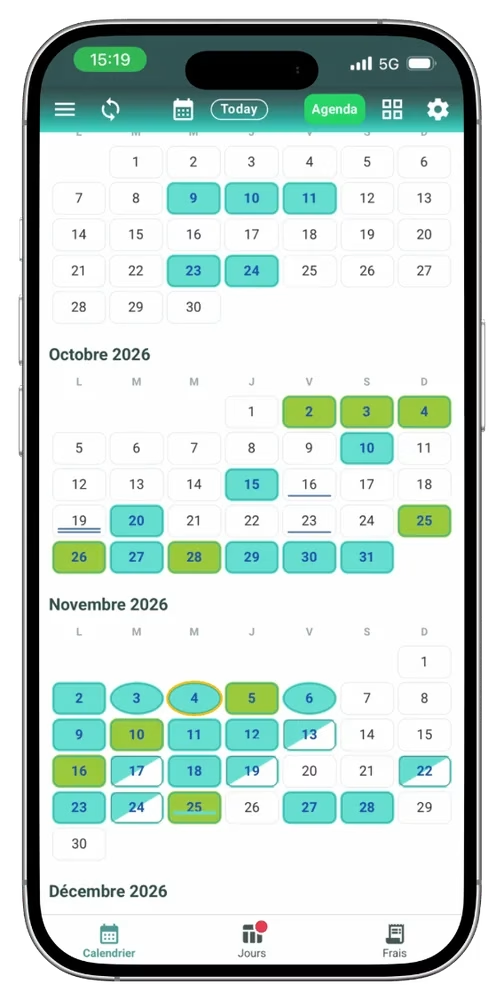
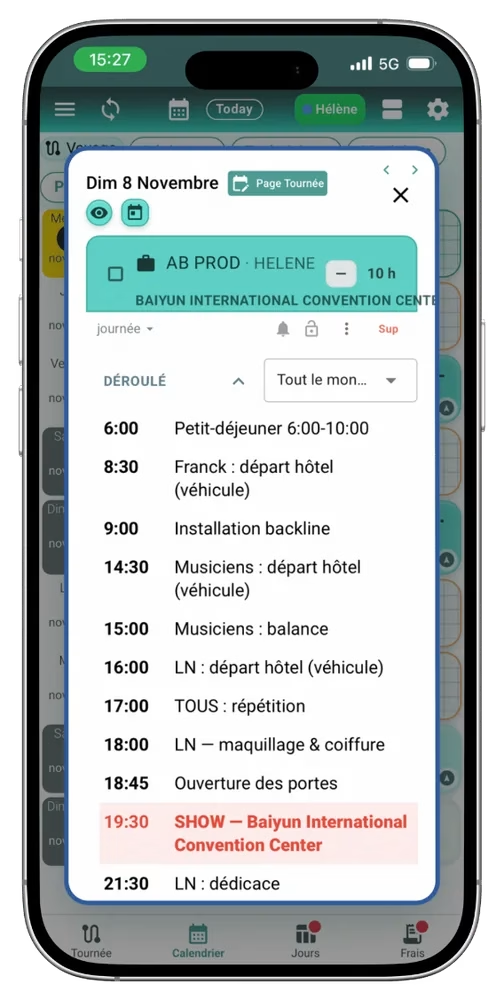
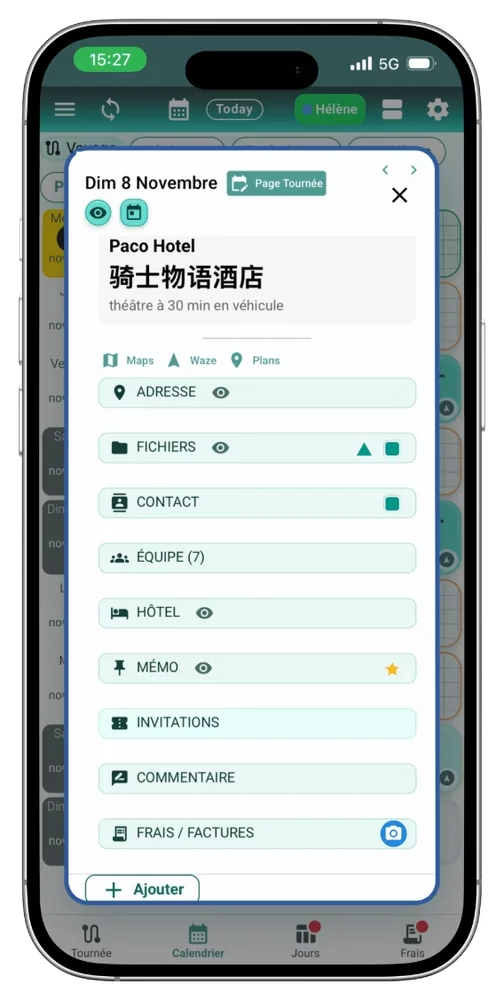
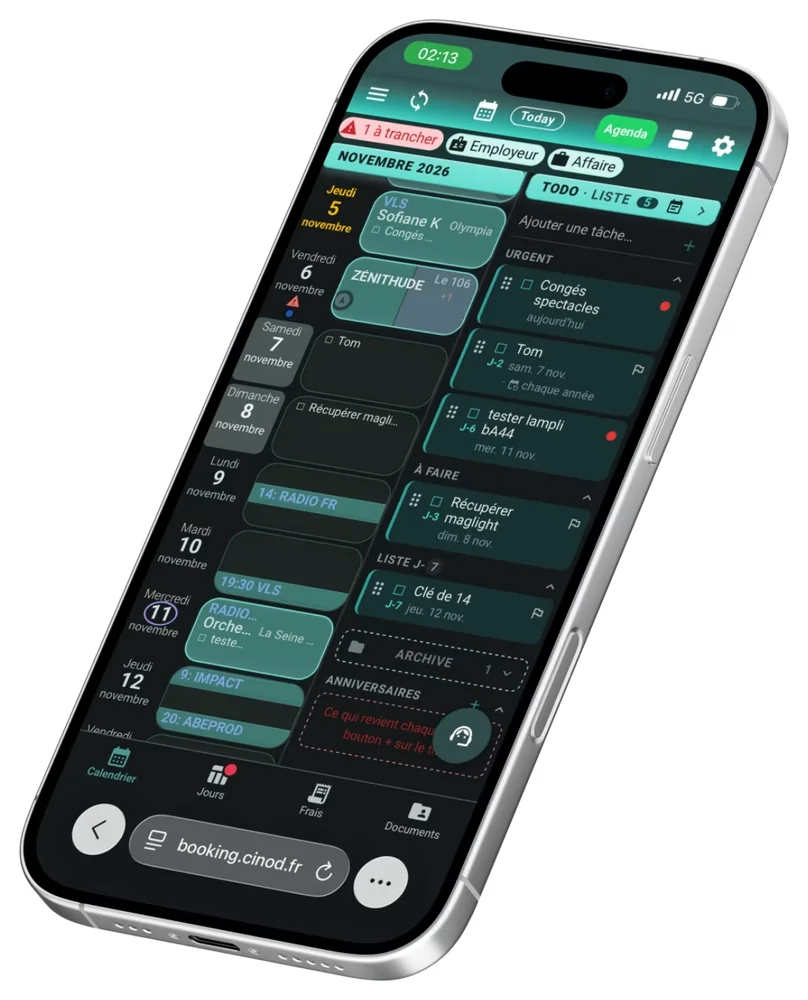
The whole day in one slot.
Your calendar replaces your usual diary: work, appointments, tasks and birthdays in one place.
- Employer, times and venue in every slot, in week, month or year view.
- Up to 3 jobs a day with different employers.
- Your availability under control: holds, hidden days, and you choose what each employer sees.
- Directions in one click in Waze, Google Maps or Apple Maps.
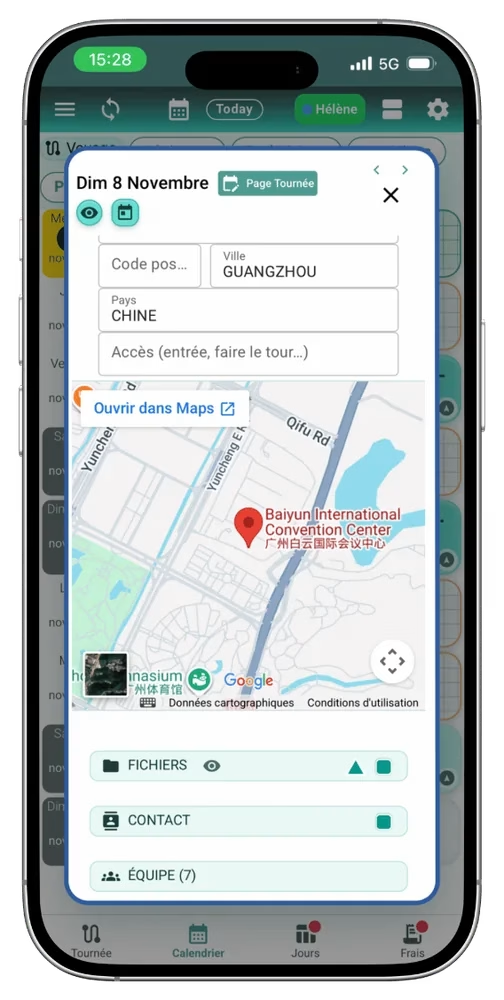
- The day’s schedule and day sheet: address, shared files, contacts, crew, hotel, stage plot and lighting plot.
- Tasks and appointments in the same calendar, with reminders.
- Your Google, Apple or Outlook calendar: your dates show up there automatically, and the other way round.
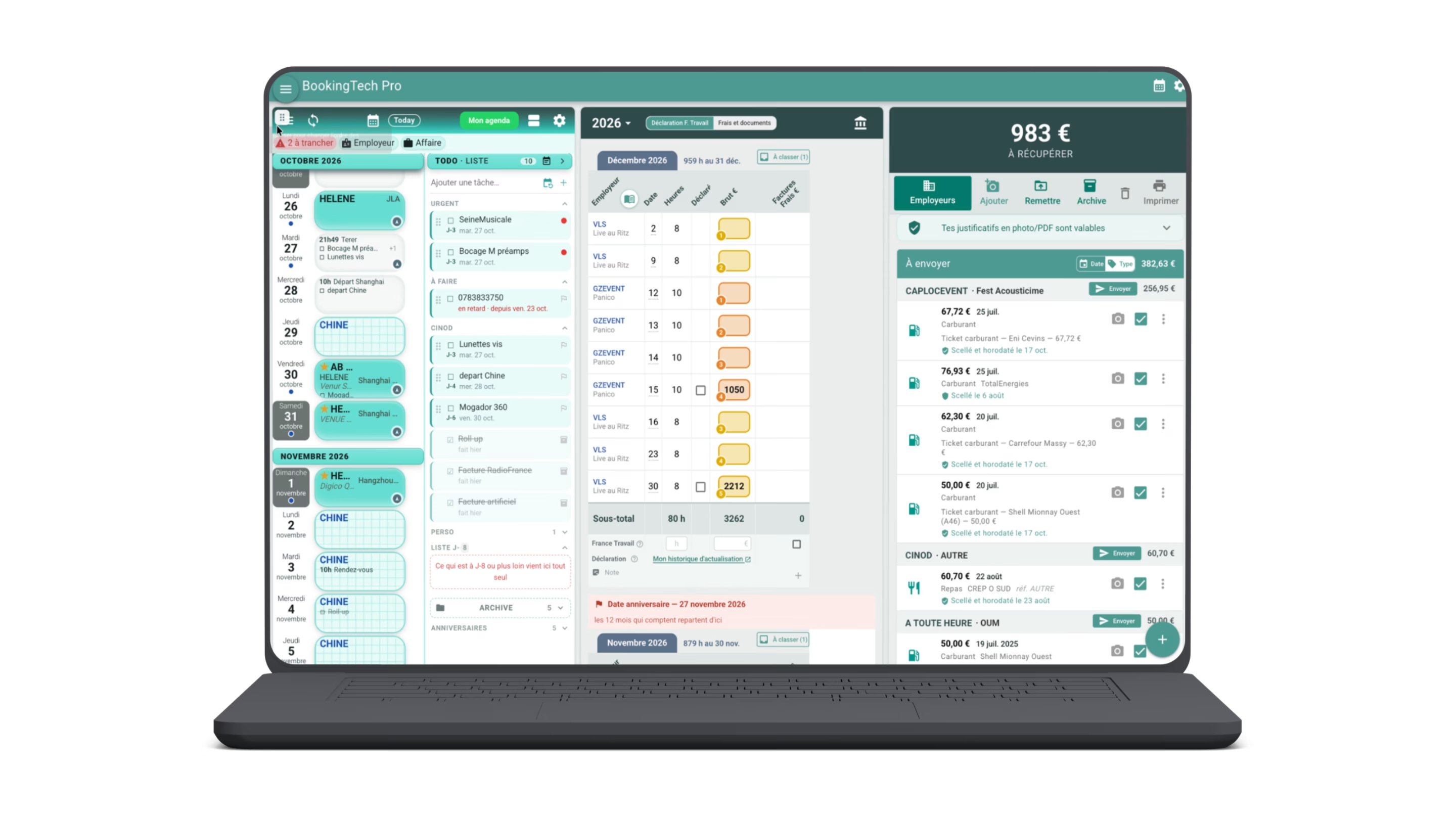
Two or three columns side by side.
One column on your phone. On a computer, up to three phone-width screens side by side, which you rearrange by dragging them and resize with the mouse.
Light or dark theme, your choice, on phone and computer alike.
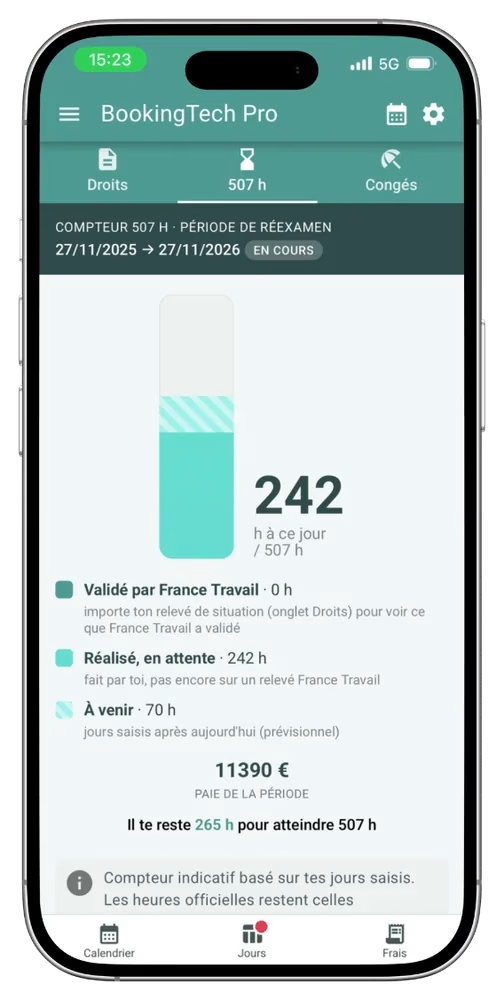
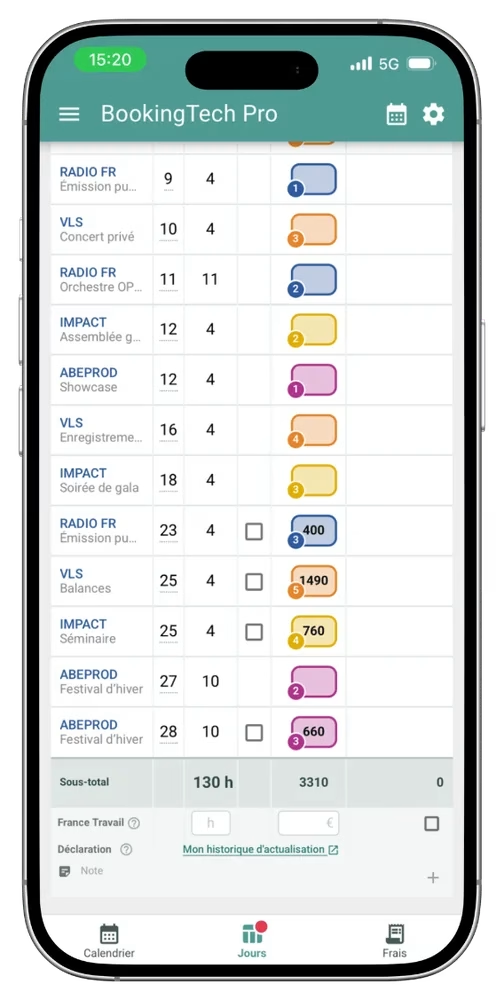
The 507-hour counter, always up to date.
For French intermittents: every day you log counts, so you know where you stand in your review period.
- 507-hour counter: hours validated by France Travail, worked but pending, and upcoming, plus what you still need.
- Days worked per employer and date, with hours and gross pay, and the monthly total.
- Import your France Travail statement: hours and gross pay fill in, declared days get ticked.
- Declaration reminder for France Travail, with direct access to your update history.
The counter is for guidance only: the official hours are those retained by France Travail.
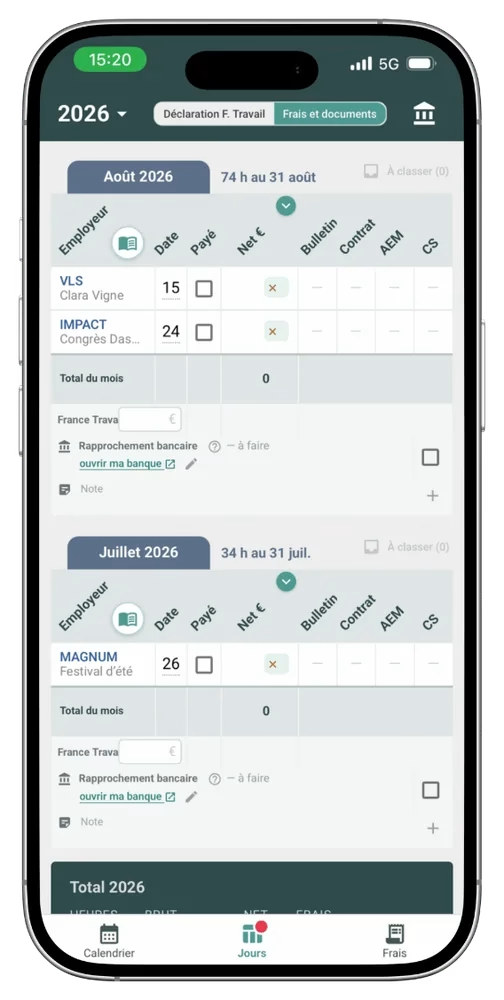
No more lost paperwork.
- Your contracts to sign: received in the app, signed in seconds, sent straight back to the right contact. Signature certified by a trusted third party, compliant with the EU eIDAS regulation.
- Your expense reports: a photo of the receipt, certified by a trusted third party, sent to the production, with reimbursement tracking.
- Your invoices: created and sent from the app, shown in your calendar on their issue date, ticked as paid when the money arrives.
- Bank reconciliation: import your statement and the app checks that every salary, reimbursement and invoice payment has arrived.
- Your documents filed automatically: contracts, payslips, AEM, Congés Spectacles, by year, month and type, found in two seconds.
- Your hiring documents at hand: bank details, information form and supporting documents sent on request, in one click. You are always the one who sends them.
A question about the scheme? Just ask.
- Your intermittence assistant: ask by voice or text, listen to or read the answer. Everything is based on official documents (French scheme).
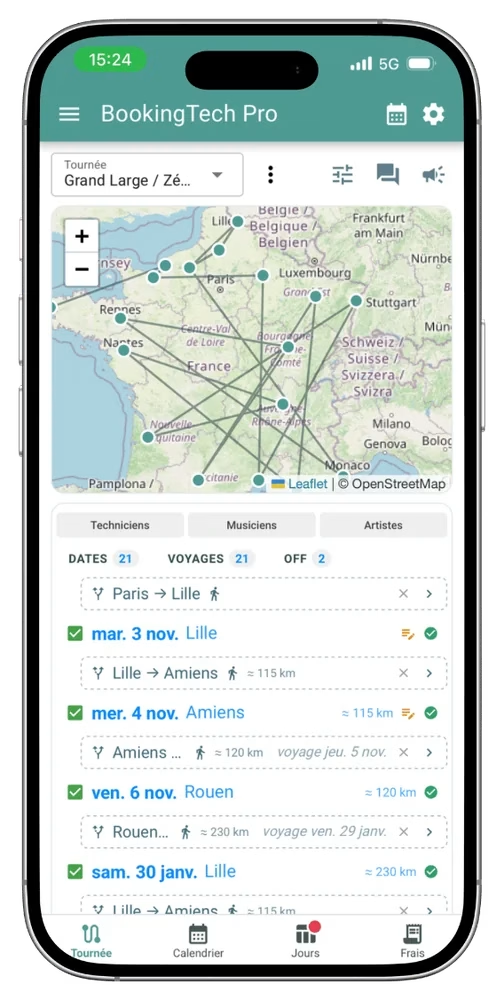
- Tours: each day’s schedule, the day sheet, journeys and mileage on the map.
… and much more to discover by trying it.
In short
The intermittents’ calendar brings together everything in the working life of a live event technician: dates, projects, documents, pay, invoices and, for French intermittents, the France Travail declaration. It pulls in your other calendars, files contracts, payslips and certificates automatically, counts hours towards the 507-hour threshold and checks payments on your bank statement. Contracts are signed in the app and expense receipts are photographed, with certification by a trusted third party.
It is the technician side of BookingTech. It works on its own, whether or not your employer uses BookingTech. If you are not an intermittent, turn off intermittent mode in the preferences: everything else stays.
The problem
Live event technicians work for many employers and clients, each with their own tools. Their information ends up scattered everywhere.
- Dates are spread across several calendars, messages and calls.
- Contracts and payslips sit with each employer, often in different digital vaults.
- Expense receipts get lost, and reimbursements and invoice payments are not always checked.
- When it is time to declare, everything has to be rebuilt: days worked, hours, pay.
- Every new hire asks for the same documents: information form, occupational health certificate, ID.
One calendar for everything
- It pulls in your other calendars. Google Calendar, Apple and Outlook sync both ways, and calendars from other touring tools such as Master Tour can be imported.
- A call comes in, you note the date right away. “Are you free that day?”: you add a hold or a confirmed date, with the project and production name and the type of day (load-in, show, load-out). Details are added as they come in: files, crew, exact address.
- On the day, one click is enough: schedule, address with directions in Waze, Google Maps or Apple Maps, contacts, crew, hotel.
- For a festival, each day has its own information: patch sheets, stage plots, lighting plots.
- Work, appointments and tasks in the same calendar, up to 3 jobs a day with different employers.
- You choose what each employer sees of your availability.
For a tour, a shared day sheet. The tour manager adds everyone they need, assigns dates as they go and confirms what goes with each date: tour, day and travel organisation, with schedule and journeys.
On a big screen: three phones side by side
On a computer screen, the calendar shows up to three columns at once, each the width of a phone: you keep exactly what matters in front of you.
- Two or three columns, at the width you want: put the mouse between two columns and drag to widen one and narrow the other.
- Movable columns: drag them into the order you want, for example calendar, task list and day detail.
- Choose where each view opens: when you open a screen, the app asks which column to use, 1, 2 or 3.
- The same principle in all Cinod apps, so you can switch from one to another without relearning.
AI on demand, and the day as it happens
AI is there, but you decide: you can never use it, or use it now and then. Wherever the small “AI” sign appears, one click is enough.
- Tech riders summarised: a quick summary when you need it, and a check that the useful information is there. The original is always one click away.
- A comment on the day: if something important happens, leave a comment for the tour manager or the employer.
- A photo, an expense: add a photo or a cost directly to the day.
- Reminders: don’t forget a tool, a headset or anything else important on the day.
Documents filed automatically
- Point the app to a folder, even a messy one, that contains all your files.
- The app recognises each document and files it by year, month and type: contracts, payslips, AEM, Congés Spectacles certificates.
- When a document is not recognised, the app opens it and asks: just tick what it is.
Missing documents show up clearly, month by month and employer by employer. A misfiled document moves with one gesture.
Hours, pay and France Travail (intermittent mode)
- Days worked, hours and gross pay per employer and date, as the information comes in.
- A summary per project and per month, adding up repeat work for the same company.
- A declaration module: when it is time to declare, the figures are already filled in.
- France Travail file import: once the declaration is done, the file is recognised and the hours retained are shown.
- The 507-hour counter and an assistant that answers questions about the scheme, based on official documents.
Contracts, expenses, invoices and bank
- Contracts are signed in the app and sent back automatically to the right address. The signature is certified by an accredited trusted third party, in line with the EU eIDAS regulation, and included in the technician’s Premium version at no cost per contract.
- Expense receipts are photographed and certified automatically by timestamp and digital fingerprint, then sent to the production, with reimbursement tracking.
- Invoices, for those who invoice. Self-employed, company, or intermittent invoicing a job: the invoice is created and sent from the app, appears in the calendar on its issue date, and is ticked as paid automatically during bank reconciliation.
- Bank reconciliation. Import your bank statement as a PDF, month by month. The app checks that every salary, reimbursement and invoice payment has arrived, and flags amounts it does not recognise.
- An employer address book: for each employer, who gets the expenses and who gets the contracts. Once set, sending is automatic.
Plans for the technician
| Version | What it does |
|---|---|
| Free | The full calendar: dates, holds, projects, schedules and day sheets, sync with other calendars, and many other everyday features |
| Premium | Plus: contract signing, document management and filing, intermittent hours tracking and France Travail follow-up |
Why it is different
- One place for everything: calendar, projects, documents, pay, expenses and invoices.
- Your documents belong to you: gathered and filed on your side, not scattered across providers chosen by each employer.
- Proof for every document: contracts and expense receipts certified by a trusted third party.
- Designed by a technician, from real needs on the road and in venues.
Before you start
I’m not an intermittent. Is it for me?
Yes. Turn off intermittent mode in the preferences: you keep the calendar, day sheets, contracts, expenses, documents and bank reconciliation. If you invoice your work, your invoices appear in your calendar on their issue date and are ticked automatically when the payment reaches your account.
Do I need to install an app?
No. The calendar opens in your browser at booking.cinod.fr, on your phone, tablet or computer.
Do my employers need to use BookingTech?
No. You can keep your calendar, hours and documents on your own. If an employer uses BookingTech, their date offers and contracts arrive directly in your calendar.
Who sees my availability?
You decide. For each employer, you choose what you share, and you can hide days or a hold until a few days before.
Can I sync with my current calendar?
Yes, with Google, Apple or Outlook, both ways.


